
Stock and supplies under control - eCaupo can take that over for you
Would you like to alert customers that only a few portions of a dish are left? Or hide it in the shop when it's sold out? Item stock is an extension you can install via the eCaupo Marketplace. Afterwards you enable stock management for each item you want.
Settings per item or price
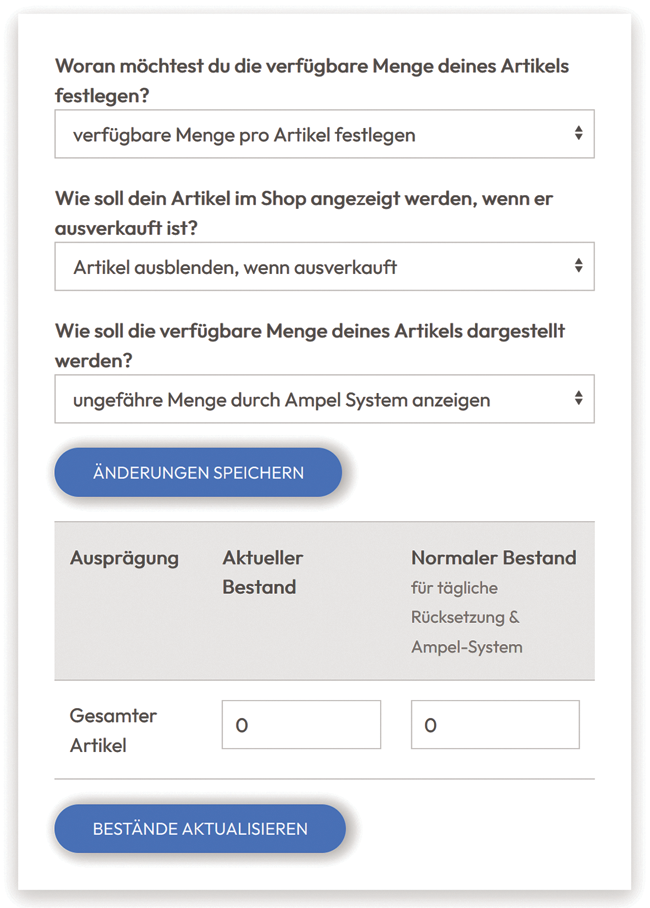
On the right you can see the configuration options for each item or each price of an item.
You can store a normal stock as well as a current stock. The normal stock indicates how many dishes you generally have when your shop opens. The current stock is automatically reduced with every sale and shows you how many dishes are still available. Of course, you can intervene at any time and adjust the value yourself.
In the settings above, you define how you want to handle the stock. You can hide a dish when it's sold out, i.e. when the current stock is zero. But you can also keep the dish visible while preventing it from being purchased.
The available quantity can also be presented so that the customer sees a message along the lines of “Only a few left”. The shop controls this fully automatically if you want to display such a notice.
From just €39 you have everything.
Your own delivery shop instead of an expensive portal — try it now without obligation.
Try for free now →